
3 slides everyone uses (but you should delete)
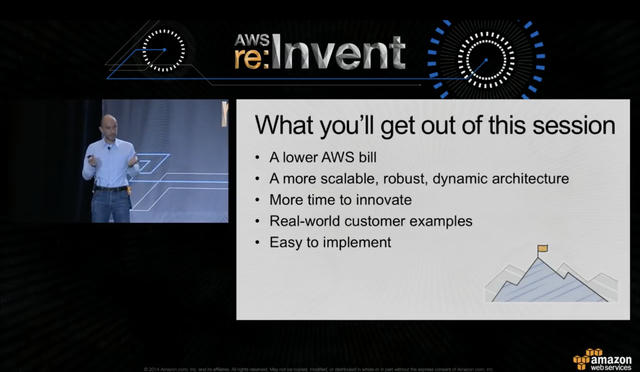
In 2014, I was preparing my AWS re:Invent presentation on “Running Lean Architectures.” I had my slides ready: agenda, bio, resources.
Then I stopped.
Why was I presenting this in the first place?
The answer: to help people save money on AWS.
Not to check boxes on a corporate template. Not to prove I was qualified to speak or that I did my homework.
I deleted my agenda slide and replaced it with one titled “What you’ll get out of this session”, the one you see above. The first bullet point: “A lower AWS bill.”
That moment changed how I think about presentations. Every slide should serve the audience, not the presenter. Yet in the 25 years since, I’ve watched thousands of presentations make the same mistake: filling slides with content that serves them, not their audience.
In this video, I break down the three most common offenders:

Here’s why these slides fail, and what to do instead.
The real problem: who are your slides for?
Before we dive into specific slides, here’s the core issue: presenter-centric vs. audience-centric thinking.
Most presenters follow templates that make them feel safe, copy-pasted across generations of designers. The agenda keeps them on track. The bio proves they belong there. The resources list shows they did their homework.
But here’s what’s really happening: while you’re making yourself comfortable, your audience is reaching for their phones.
Those little gadgets are your real competition. Highly optimized, attention-stealing mind-control devices that offer instant gratification. Every slide that doesn’t serve your audience is an invitation for them to check “just one more notification.”
Once they’re lost in their feed, it’s hard to get them back.
So let’s look at the three slides that hand your audience over to their phones—and what to do instead.
Slide #1: Agenda (your to-do list, not their value)
What presenters think they’re doing:
“I’m being organized and professional. I’m showing respect by letting them know what to expect.”
What they’re actually doing:
Creating a to-do list for themselves. Every agenda looks the same: Introduction, Topic 1, Topic 2, Topic 3, Q&A. It’s the presenter’s checklist, dressed up as audience service.
What the audience experiences:
The groan: “Yet another agenda slide.” They’ve seen this template a thousand times. Time to check their phone.
Nobody came to your session to see your table of contents. They came to solve a problem or learn something valuable!
The better alternative: Expectations
Replace your agenda with clear expectations. Instead of listing topics, tell them what they’ll gain:
- “What you’ll get out of this session: A lower AWS bill”
- In the next 30 minutes, you’ll discover why your customers ignore your product, and the one question that changes everything
- “Today, you’ll learn three techniques that cut deployment time in half”
Why it works:
First, it’s a positive surprise. Everyone expects an agenda. So when you deliver something better, you’ve earned their attention.
Second, expectations create productive tension. You’ve opened a story loop in their minds. They want to see it resolved. Movie trailers don’t give you a table of contents—they create anticipation.
Third, expectations build trust. When you exceed what you promised (and you should always aim to exceed), you’ve demonstrated that their time was well-invested. That one extra insight at the end, beyond expectations, can elevate your presentation from good to great.
Slide #2: About Me (your validation, not their value)
What presenters think they’re doing:
“I need to establish credibility. They need to know I’m qualified to be here.”
What they’re actually doing:
Seeking validation. The bio slide reassures the presenter: “I belong here. I’ve earned this stage.” It makes them feel better about presenting, helps keep imposter syndrome in check.
What the audience experiences:
Indifference, at best. Mild annoyance at worst.
They already know your name and job title: it’s on the title slide and in the conference program. If they’re curious about your background, they’ll check LinkedIn later.
What they don’t know yet is whether you’re going to waste their time or deliver value. And you’re currently wasting their time with your CV.
I’ve watched speakers uncomfortably skip past their own bio slides, as if their subconscious mind knows something’s wrong. Their body language says: “Sorry, our corporate template made me include this.”
The better alternative: authority through value delivery
Want to establish credibility? Deliver value. Share insights. Solve problems. Tell stories that illustrate hard-won lessons.
Skip the bio slide entirely. Then, throughout your presentation, weave in short stories:
- “When I worked with a startup trying to cross the chasm, we discovered…”
- “In my 12 years at AWS, I learned that…”
- “I made this mistake three times before I figured out…”
Why it works:
You’re building authority while delivering value. The audience gets useful information and learns that you know what you’re talking about. Two birds, one stone.
More importantly, you’re making it about them, not you. They’re the hero of this story. You’re the guide who’s been down this path before.
That’s the role you want. Not “impressive person with credentials,” but “trusted guide who serves their audience.”
(Do you have an “About the company“ slide? Delete it, too, for the very same reasons!)
Slide #3: the resources (your homework proof, not their next step)
What presenters think they’re doing:
“I’m being helpful! Look at all these valuable resources I’m sharing.”
What they’re actually doing:
Creating decision fatigue and proving they did their homework. That wall of URLs and QR codes isn’t for the audience—it’s the presenter covering their bases.
What the audience experiences:
Overwhelm. And their mind is already wandering.
By the end of your session, they’re thinking about coffee, their next meeting, or whether they need a bathroom break. Their cognitive load is maxed out from absorbing your content.
Now you’re asking them to choose between ten resources? That’s not helpful—that’s homework.
Yes, they might take a photo of your resources slide. But let’s be honest: how often do you actually go back and look at those photos later?
The better alternative: One clear next step
Give them a single, specific call to action. Not ten options—one action.
Make it ultra-specific: “When you get back to your desk on Monday, right after you file your expense report, do this one thing…”
(I use that exact phrasing when coaching speakers. They laugh, but it drives the point home: specific and immediate.)
Examples of good single CTAs:
- “Visit booth #47 for a live demo”
- “Go to <URL> for the one-page template”
- “Complete the hands-on tutorial lab now, to experience this solution in real life”
Why it works:
Low friction. Clear reward. Immediate action.
You’re respecting that they’re overwhelmed and tired. You’re making it easy to take the next step. You’re trusting that if they want more information, they know how to use a search engine in 2025.
Or better yet: create a one-page handout that summarizes your key concepts. This gives people something tangible and makes you memorable. Plus, it’s a much better follow-up tool than “can I get a copy of your slides?”
The transformation: from template-follower to trusted guide
Here’s what all three of these slides have in common: they serve the presenter’s need for comfort, not the audience’s need for value.
Templates make us feel safe. They tell us we’re doing it “right.” They protect us from the fear of being unconventional.
But: great presenters are unconventional. They stand out precisely because they don’t follow the template everyone else follows.
The stakes are real. In an age of attention-hogging mobile phones and infinite distractions, losing your audience means losing relevance. Lower ratings. Fewer speaking opportunities. Less impact with the insights you worked hard to gain.
But when you make the shift, when you put the audience first, look beyond the templates, and replace those comfort slides with audience-centric alternatives, you become memorable. You get invited back. You create real impact.
You transform from someone following corporate templates into a trusted guide who serves their audience.
Your Next Step
Pick one presentation you’re giving soon.
Open the deck. Find these three slides. Delete them. Or better yet: replace them with the alternatives suggested above.
Make your slides serve your audience, not yourself.
Your audience will thank you. And your phone-checking problem just got a lot smaller.
P.S.: If you want to discuss your specific presentation, feel free to book a slot during my office hours. P.P.S.: What slides are you deleting from your presentations? Share this post on your favourite social network and tag me, I‘d love to see what you discover!