
Local audio transcription with mlx-whisper: what actually works
I’ve been transcribing my YouTube videos locally for a few months now. It took some trial and error to get a setup that actually works reliably, so here’s what I learned.
The problem
I wanted good subtitles for my videos—for accessibility, but also so I could feed the transcripts to Claude for generating chapter markers and summaries. The auto-generated subtitles I saw on YouTube weren’t great: weird punctuation, mangled technical terms. And I didn’t want another SaaS subscription.
So I went down the rabbit hole.
First attempt: OpenAI Whisper
The obvious choice: OpenAI’s Whisper. Open source, well-known, everyone says it’s amazing.
And it is—kind of. The quality is good, but on my MacBook Pro M1 it was painfully slow. We’re talking much slower than real-time, with minutes of loading before it even started processing. It wasn’t using the GPU at all.
There had to be something better, so I kept on searching.
The solution: mlx-whisper
mlx-whisper runs Whisper on Apple’s MLX framework, optimized for Apple Silicon. The difference was night and day. Same 5-year-old MacBook, suddenly transcription was faster than real-time. (Yes, there’s still the initial delay for downloading the model weights from the Internet, but it caches them, so no big deal. There’s also a lag for loading the model weights into memory, but overall, still much, much faster than original Whisper.)
Installation is dead simple if you use uv:
uv tool install mlx-whisperThat’s it. No ML driver headaches, no dependency hell.
The Crisis
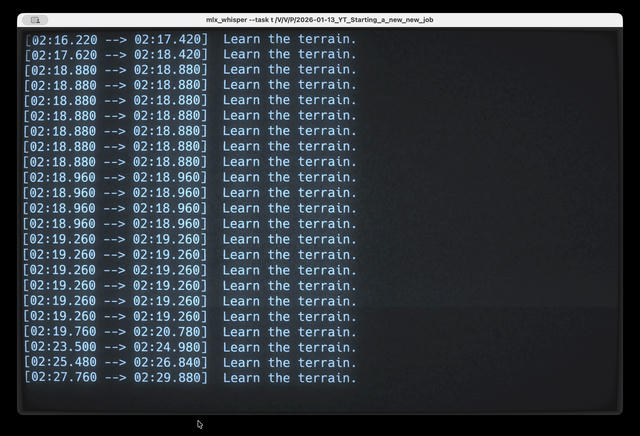
For a few weeks, life was good. Then I was transcribing a new video with tips on starting a new tech job, and the output looked like this:
Learn the terrain.
Learn the terrain.
Learn the terrain.
Learn the terrain.
Learn the terrain.
The same words, repeating for entire paragraphs. My transcript was useless.
I almost gave up and paid for a SaaS service. But I gave it another shot and searched for the problem in Perplexity. Turns out this is a known Whisper issue. The model uses previous context to improve accuracy, but sometimes gets stuck in a loop.
The Fix: One Flag
--condition-on-previous-text FalseThat’s it. One flag. It tells Whisper not to use its previous output as context, which prevents the repetition loop. The accuracy is still excellent without it.
My Complete Setup
Here’s the Fish shell function I use every week:
function gen-subtitles
    mlx_whisper \
        --task transcribe \
        --model mlx-community/whisper-large-v3-turbo \
        --language en \
        --output-format srt \
        --word-timestamps True \
        --max-line-width 42 \
        --max-line-count 2 \
        --condition-on-previous-text False \
        "$argv"
end
What each flag does:
--task transcribe: Transcribe (don’t translate, which apparently it can do, but I haven’t tried yet)--model mlx-community/whisper-large-v3-turbo: Best balance of accuracy and speed I’ve found--language en: Skip language detection, improves accuracy--output-format srt: Standard subtitle format, works everywhere--word-timestamps True: More precise timing--max-line-width 42and--max-line-count 2: Keeps subtitles readable on screen--condition-on-previous-text False: The hero flag that prevents repetition
Now I just run gen-subtitles video.mp4 and get a clean SRT file in a few minutes.
Not 100% perfect, but close
mlx-whisper is really good, but not perfect. I still do a quick pass in vi to fix maybe 5% of the output—a comma that should be a colon, a technical term that got mangled, adding quotes around citations.
But that’s editing, not rewriting. 95% of the work is done well. Much better than paying $20/month or doing it by hand.
Beyond Subtitles
Once you have easy local transcription, you start seeing uses everywhere:
- Voice memos: Capture ideas while walking, transcribe later into searchable notes
- Meeting recordings: Transcribe locally, everything stays on your machine
- Learning from podcasts: Transcribe, then ask Claude to summarize or extract key points (I use Simon Willison’s llm tool for this)
- Content repurposing: Transcript → chapter markers → show notes → blog post
The transcript is so much more useful than for just subtitles.
Video
Here’s a short video walkthrough with a bit more personality and some fun drama elements:
